What Staying on Claude Pro Taught Me

About five years ago, I made it to the final loop round at Amazon. Preparing for that interview made me look deeper into my own thinking than any interview before it, not just what I had done, but why I had made the choices I did, and what that said about how I work. Amazon's leadership principles have a way of doing that. One of them is Frugality.
Accomplish more with less. Constraints breed resourcefulness, self-sufficiency, and invention.
Fast forward to this year. Everyone around me was jumping to the Max plan, talking about unlimited usage, doing more with more. I went the opposite direction. I deliberately stayed on Pro (for the initial few months) - not because I couldn't upgrade, but because I wanted to understand my usage patterns before scaling them. What happens when you actually pay attention to what you're spending?
Turns out: you learn a lot.
First, the map I wish I'd had
Before I get into what I found, here's something most people don't explain clearly. Without it, none of the learnings below will fully make sense.
When you send a message to an LLM, two things happen simultaneously:
Input tokens: everything the model reads in that single call: your message, the full conversation history up to that point, and any system instructions loaded into the session.
Output tokens: what the model writes back.
Now, there are two separate limits you can hit:
The context window is like the model's working brain for a single conversation: how much it can take in and respond to at once. Long conversations fill it up faster than most people expect.
The token usage quota is your total allowance per usage window, determined by your plan. This is entirely separate from context. You can make many short calls and burn through your quota just as fast as one large one. It's the billing bucket, not the memory limit.
The critical link: every time you interact with Claude or any LLM, you are drawing from both: the context window and your token allowance, at the same time.
With that map in hand, here's what I actually ran into.
Learning 1: Your conversation is getting heavier every message
The model has no memory of its own. Every time you send a message, the entire conversation (every exchange before it) is resent as input. Message 3 carries messages 1 and 2. Message 15 carries everything before it. By the time you're deep into a complex task, each new message is expensive before you've written a single new word.
The fix: I added a status line to my setup with three color gradients showing real-time token burn. And I built the habit of summarizing sessions into memory files before they got too long, so starting a fresh session didn't mean starting from scratch.
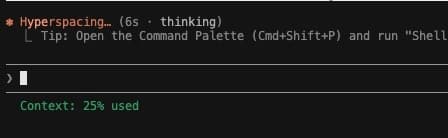
Takeaway: Watch your session length. Summarize and reset before the conversation gets too heavy to carry.
Learning 2: MCP tools can fill your context before you type anything
I had connected the PostHog MCP to both Claude Code and the Claude desktop app. One day I opened the desktop app, typed a completely generic question (nothing heavy, nothing complex) and hit enter. It wouldn't send. The session had already hit its limit and I hadn't written a single line.
I was genuinely puzzled. Claude Code was working fine in the same period. Same account, same plan. So I started digging.
What I found: the PostHog MCP loads over 120 tool definitions the moment it connects, each tool's name, description, and full parameter schema injected into the system prompt automatically. That's thousands of tokens consumed at connection time, before the conversation even begins. In the desktop app, this happens upfront for every session. In Claude Code, it's different: tools are only loaded into context when you actually invoke them.
Solution: I removed the MCP connection from the desktop app entirely and kept it only in Claude Code.
Takeaway: Connect MCP servers only where you actually need them. Not every surface needs every tool.
Learning 3: Know which tool fits the task before you start
I had a simple task: browse a few YouTube channels, extract some details, and log them into a Google Sheet. I set it up using Claude's computer use feature. It opened a tab in my browser and took over.
There's something genuinely surreal about watching a cursor move on its own, clicking, scrolling, filling in fields like a ghost at the keyboard. It's hard not to feel a little adrenaline. But that feeling is exactly when you need to pause and ask: what is this actually costing?
Here's what I hadn't fully accounted for: Claude's computer use works by taking screenshots of your browser page and sending them as images for analysis. Every step (every navigation, every scroll, every decision) involves a screenshot, and image analysis costs significantly more tokens than text.
Because I was on a free YouTube account, ads kept appearing. Each ad meant an extra screenshot, extra analysis, an extra click to dismiss before the actual task could continue. Even entering data into Google Sheets was handled like a human would: one cell at a time, with a screenshot taken at each step.
I asked Claude Code to generate a simple Python script using the YouTube Data API instead. Same data, Google Sheet updated, done in a fraction of the time and tokens.
Takeaway:Computer use is powerful when there's no alternative. When a clean API or script exists, use that instead.
Learning 4: Large file generation burns through your usage quota fast
There's a similar adrenaline hit when you watch Claude generate code. Lines appear faster than you could ever type them: entire components, full layouts, structured logic, all materialising in seconds. It feels like the work is getting done at an extraordinary pace. And it is. That's also precisely when the token meter is running hardest.
This one catches people off guard because it feels like a context problem, but it's actually a quota problem, and those are different.
I put Claude into plan mode with a clear vision: build HTML screens from scratch, two tabs, multiple features, nothing borrowed from an existing design system. Claude went off on its own, executing step by step. I could see the pages appearing, features taking shape. It was impressive.
What I didn't see was the token cost accumulating underneath. Every file written from scratch is a large block of output tokens. And as Claude progresses through its plan autonomously, each subsequent step carries the growing context of everything already done, so input costs climb alongside output costs, with no intervention from me.
Fifteen minutes in, everything was gone.
Takeaway:Use plan mode when you know exactly what you want to build. When you're still exploring, small iterations work better. You see something take shape visually, give feedback, and build on what exists rather than generating everything at once from nothing.
Learning 5: Strip the noise before it reaches the model
When you invoke an agent from Claude Code to do competitive research (browsing through competitor websites, scanning product pages, extracting details), it goes through those pages one by one.
Most web pages are JavaScript-heavy. They load ads, dynamic menus, tracking scripts, and images alongside the actual content. The agent has to process all of it to find what it's actually looking for. Every bit of that noise arrives as input tokens.
After some research, I found tools like Jina.ai (and Firecrawl, which I've seen others use). What they do is take a URL and return a clean, stripped version of the page: just the content, in markdown, before it ever reaches the model.
In my own testing, an agent completing a 20-minute research run consumed close to 40% of my token allowance. I'm still evaluating output quality (whether stripping the page removes useful content along with the noise), but the token reduction is real.
Takeaway: Pre-process web pages before sending them to an agent. Less noise in means fewer tokens spent, and faster results.
What I actually learned
None of this would have surfaced if I'd just upgraded and kept going. I would have moved faster, hit fewer walls, and understood nothing about why.
Staying constrained made me ask different questions, not just what Claude was doing, but how. Why did the context fill before I typed anything? What was the agent actually doing for 20 minutes? Why did the cursor need a screenshot just to click a button?
The Frugality principle is about being accountable for every resource you use. That's easy to nod at in an interview. It's a different thing to actually sit with it, get curious, and follow the question all the way down to the token level.
None of this was learned in a single afternoon. It came together gradually, over weeks of building AI features for my users: scoping a flow here, prototyping a screen there, running an agent for research, picking the wrong tool and watching the cost. Each small experiment surfaced one more piece. That's how this kind of intuition gets built as an AI-native product manager: not in one sitting, but in a hundred small moments where you stop and ask why.
I have since moved to the Max plan. But the habit of paying attention. That's the part I'm keeping.